
How to Enroll to Receive Your Payroll Statement by Email
Purpose:
Provide J. Ranck Electric, Inc, employees the basic steps to sign up to have their pay statement sent to their personal email address.
Prerequisite:
- Current JRE employee
Who's Responsible:
- All employees
Process:
- Go to the J. Ranck Employee Dashboard
- Access the page by using this QR code:
-

- Or type the URL link in your browser: https://apps.jranck.com.
-
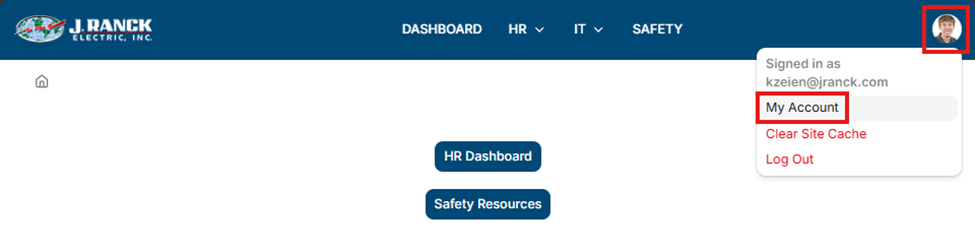
- On the main page after you log in, select your image on the top right of the screen.
- Select My Account for the drop-down list:

- You will be directed to a page where you can enter your signup information.
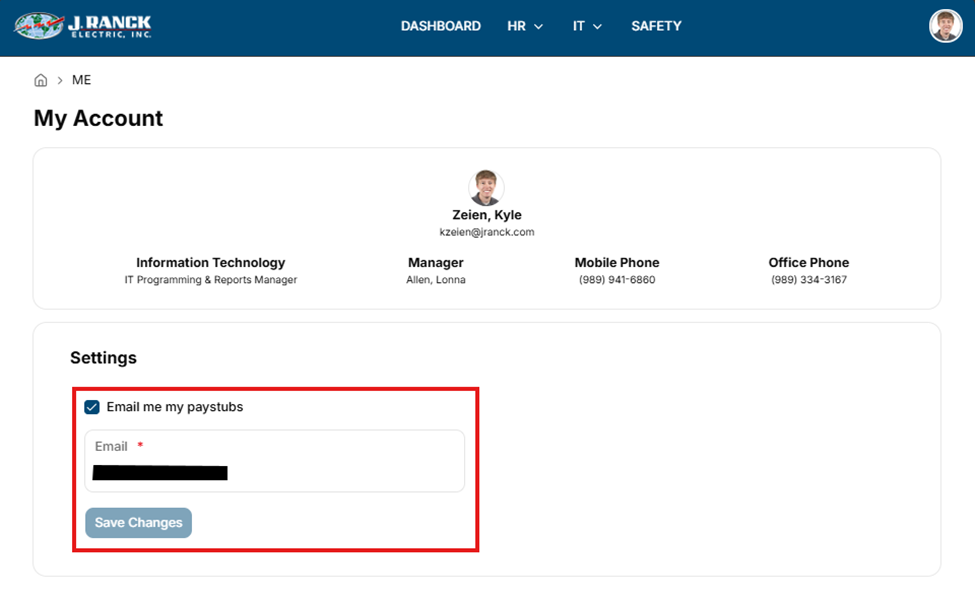
- This will take you to a form and information page. In the Settings section, check the box labeled “Email me my paystubs”. You can then enter a valid email address in the Email box. Then click on the Save Changes button.
- IMPORTANT! By entering a personal email address, you are assured that any final pay statements are received as any jranck.com email addresses are invalid once an employee leaves J. Ranck Electric, Inc.
- You may also contact the IT Department. Their staff can also sign you up.
Troubleshooting:
- For technical issues submit a ticket to IT support@jranck.com