
How to View Paystubs - Field Users
Purpose:
Show field users how to login the first time and view JRE paystubs
Prerequisite:
- Valid jranck email and initial password
Who's Responsible:
- Field employees
Process:
- Go to J Ranck web site home page
- Click the upper Right Menu option

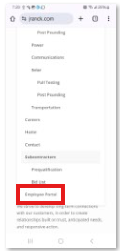
- Scroll down and click Employee Portal
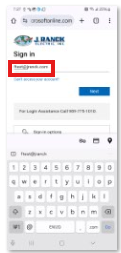
- Input jranck email address
- Change password

- Receive success message
- Go to J Ranck web site home page
- Click on Employee Portal
- Click Next

- Click Use different method

- Click Phone option

- Enter cell phone number

- Click Get code text
- Enter code received from phone text
- Click Next


- Go to J Ranck web site home page
- Click on Employee Portal
- Click Employment/Human Resources button on Our Current home page

- Click on Paystub View button

- Enter employee jranck email address
- Click Next
